
Gold-focused trading automation
Lock30x XAUUSD
MT5 EA and cTrader cBot
The official ExpertCodeFX product page for Lock30x. Choose the version built for your trading platform, review the BlackBull MT5 demo history, and test it with your broker's XAU conditions before live use.

Choose the correct version
Separate products for separate platforms
MetaTrader 5 and cTrader use different automation formats. Purchase and install the edition made for the platform you actually trade on; an MT5 EA cannot be attached inside cTrader and a cBot cannot run inside MT5.
cTrader upgrade status
Four-engine v2.90 is being validated
The linked cTrader Store page still describes the earlier Lock30x configuration. The proposed v2.90 upgrade is a separate review build and has not been published to the Store. Check the version shown in cTrader before following any setup or result from another build.
The candidate brings selectable Range, Sessions and Portfolio engines alongside Lock30x Core and its 48H/72H Trend Complement, with a unified stats panel. Its engines have separate trade ownership, but they share account equity, margin and overall exposure. Position sizing and risk settings need to be checked across every enabled engine; the Core's Manual Lot Multiplier does not control the other engines.
This page's BlackBull demo report is for the MT5 EA. The cTrader video and older Store statistics are not results for the v2.90 candidate. We will update the product evidence and setup guidance after testing the final cTrader package.
Practical setup
Start with the correct symbol and conservative risk
Confirm the broker's XAU symbol, contract size, tick size, spread, commission and server time. Backtest with the intended platform and broker data, then demo forward test before live trading.
BlackBull MT5 demo history
Watch the $50,000 XAUUSD demo trade history.
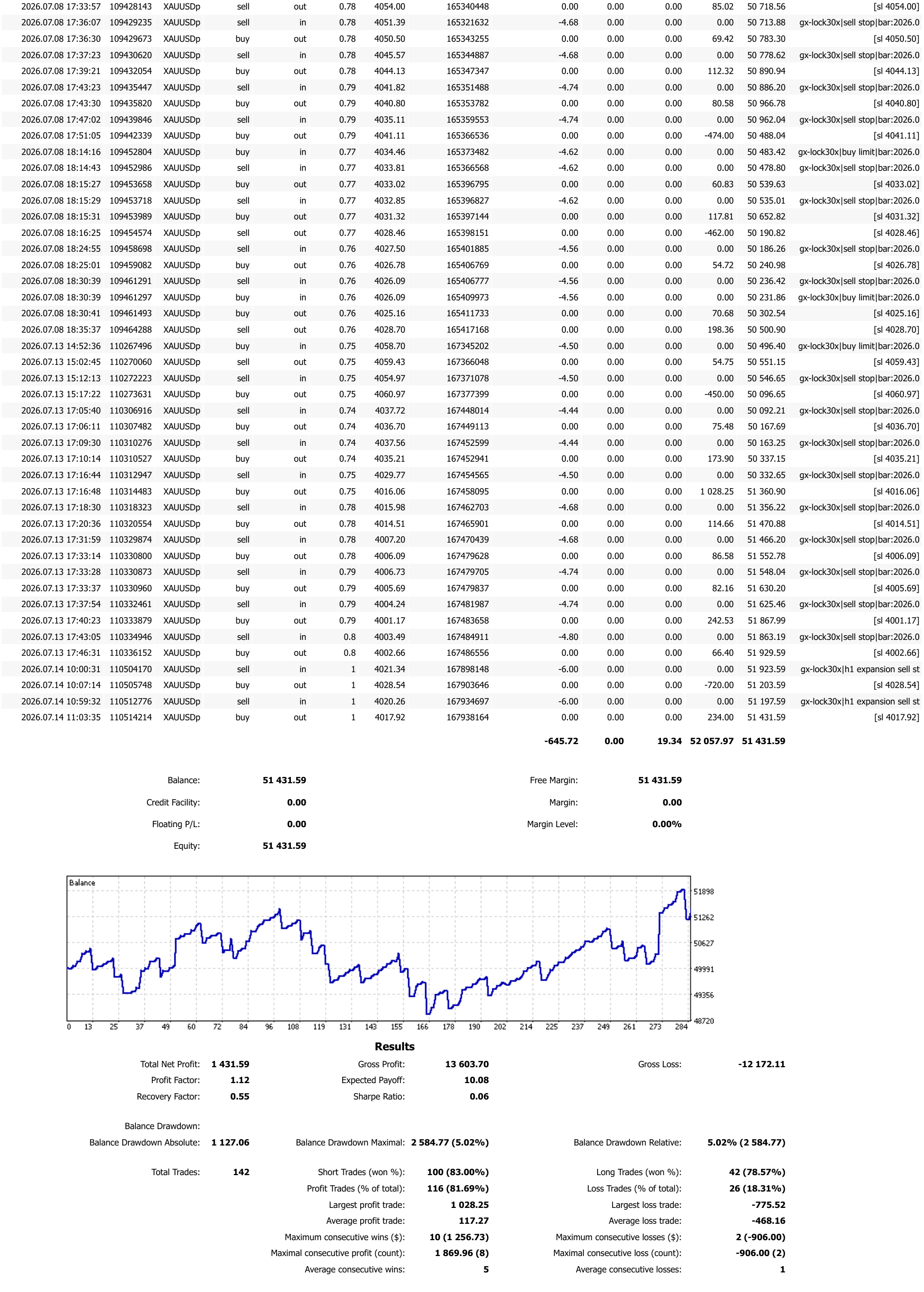
The 48-second phone screen recording shows the Lock30x MT5 EA trade history from a BlackBull Markets $50,000 demo account. The privacy-safe full PDF report and its complete result summary are published directly below.
MetaTrader 5BlackBull Markets demo$50,000 starting balanceXAUUSD
Demo and historical results are not live performance and do not guarantee future results.
BlackBull MT5 demo account · 7–14 July 2026
$50,000 demo history: +$1,431.59 net.
This is a short-duration MetaTrader 5 demo-account history exported on 15 July 2026—not a Strategy Tester backtest and not a live-account result. The figures below come from the attached BlackBull report and include both winning and losing trades.
The public PDF preserves the complete trading history and results while withholding the account holder's name and account number. The one-week observation window is too short to establish long-term robustness; broker execution, market regime, settings and costs can materially change future outcomes.
Risk disclosure
Automated trading involves substantial risk. Historical and simulated performance does not guarantee future results. Broker execution, data, costs, leverage and user settings can materially change outcomes. Test independently and never risk money you cannot afford to lose.